ReactOS (a free windows alternative / replacement) supports installing and booting off of two file systems. FAT32 and BTRFS.
General Use
Installing ReactOS onto either FAT32 or BTRFS is the same process, booting the installer and selecting what you want to format your partition as, then installing the OS.
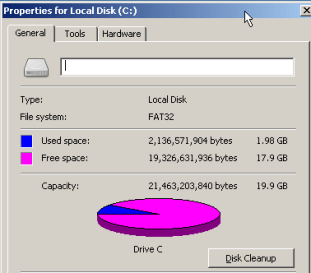
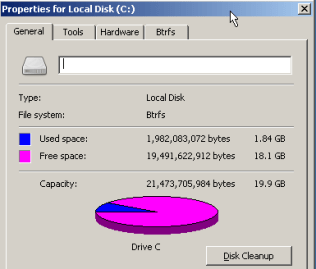
BTRFS reports less disk usage, could be more optimized.
Performance
BTRFS isn’t built for speed, but is there any difference between FAT32?
This benchmark was performed using ATTO, these reported fast speeds are due to the disk image being my server and file caching kicking in
FAT32
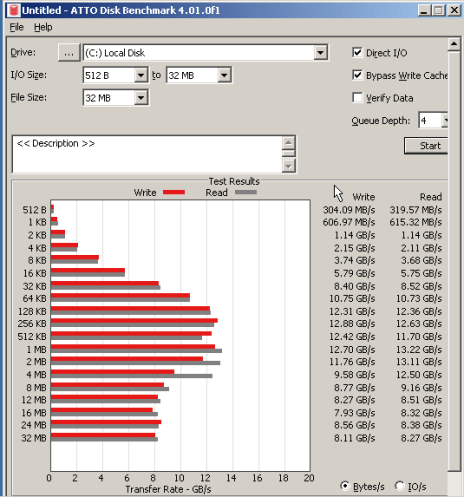
BTRFS
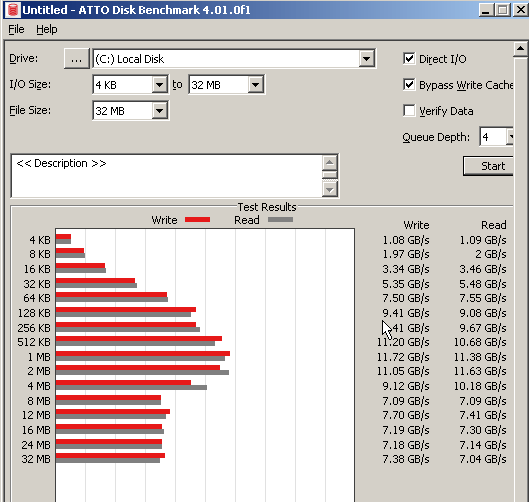
You’ll see that at the low end BTRFS is a lot faster, but it doesn’t quite reach the maximum speeds that FAT32 managed, overall, BTRFS should be the faster filesystem to use.
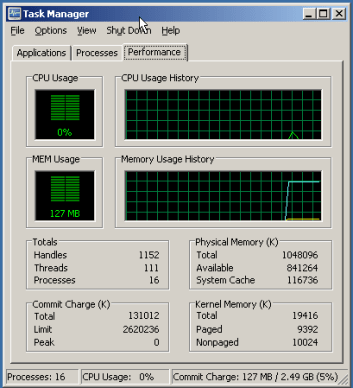
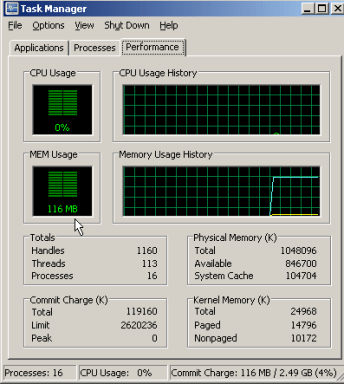
BTRFS also uses less memory at idle
Stability
BTRFS on Linux is intended to be a stable and reliable file system, so how does it stack up to the less than perfect FAT32 driver in ReactOS?
The FAT driver seems to be stable, but in the event that there is disk activity and a sudden shutdown / reboot, it’s very likely that the file system will become corrupted.
BTRFS experiences a leak that is especially obvious when making a lot of files in a short period of time resulting in a corrupted file system.

There is a patch that aims to fix this issue, there is no noticeable difference in performance with and without the patch, corrupted files did appear, and waiting a bit resulted in them seemingly being fixed, so no difference.

 Ben Does Tech